What Is a Reverse Percentage Calculation?
A reverse percentage works backward from a number you already see after a percentage was applied, recovering the hidden 100% original amount before that change took place. Whether you are stripping VAT or sales tax off a gross receipt, finding the original retail tag behind a weekend markdown, or backing out an employer's pre-raise salary, reverse percentage solves for the true starting base.
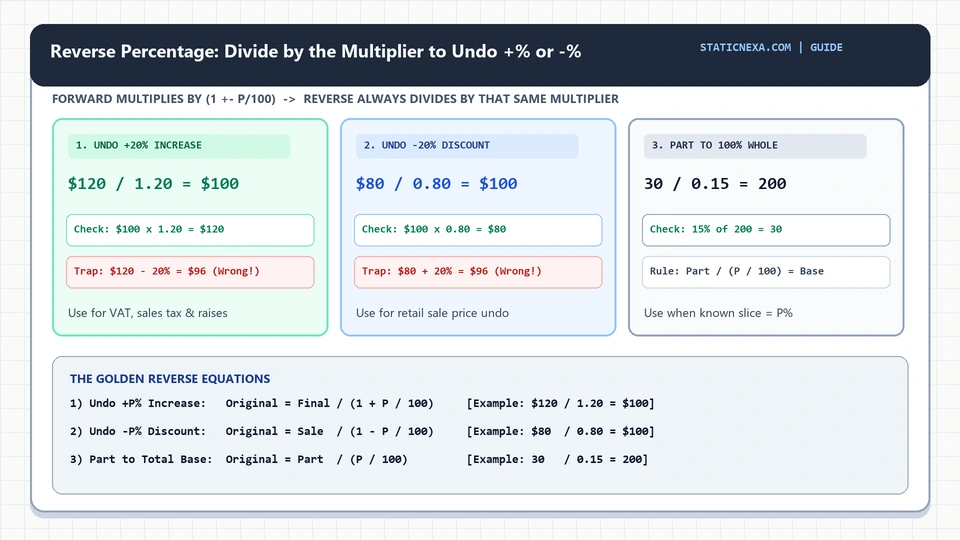
Almost everyone runs into the same mental trap the first time they work backward: if an item costs $120 including 20% VAT, subtracting 20% of $120 removes $24 and wrongly gives $96! Why does that fail? Because the original 20% tax was charged on $100, not on the larger $120 total. To reverse any percentage cleanly, you divide by the exact multiplier that created the final figure in the first place.
All 3 Reverse Percentage Formulas
Every forward percentage calculation multiplies the original base by a factor k. Working in reverse always swaps multiplication for division using the exact same factor:
2) Undo -% Discount (Sale Price): Original = Sale Price ÷ (1 − P ÷ 100)
3) Part-to-Whole Base (X is P% of ?): Original Total = Part ÷ (P ÷ 100)
- Before a Percentage Increase (Mode 1): After a
+P%gain, your final amount represents(100 + P)%of the starting value. DivideFinalby1 + P / 100(for example, divide by1.20to remove 20% tax, or by1.085to strip 8.5% sales tax). - Before a Percentage Discount (Mode 2): After taking
P%off, the sale price equals only(100 − P)%of the original sticker price. DivideSale Priceby1 − P / 100(for instance, divide by0.80after 20% off, or by0.70after 30% off). - Part to Original 100% Total (Mode 3): When a single number equals
P%of an unknown total (say a$30commission earned at a15%payout rate), divide the known slice byP / 100(30 ÷ 0.15 = 200).
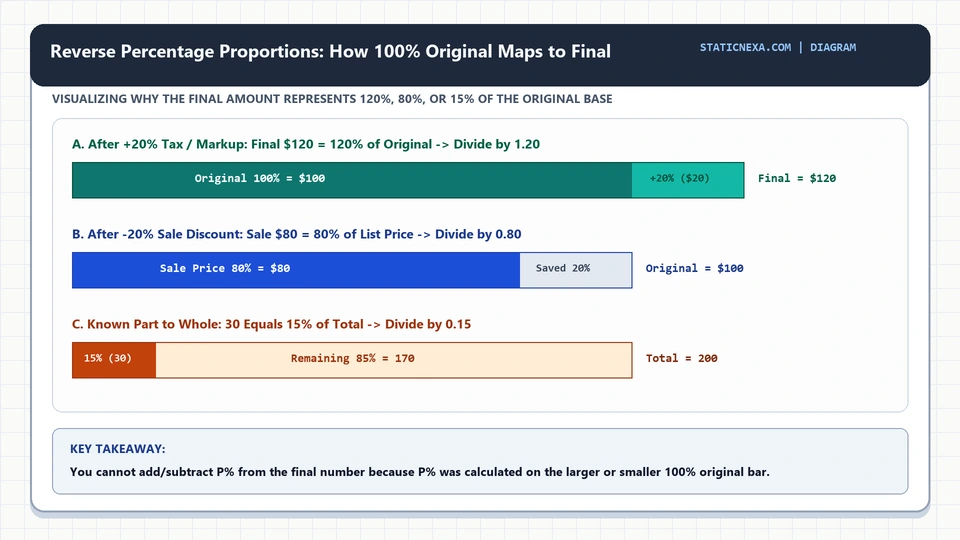
Visualizing Why the 100% Base Shifts
Picture your original price as one full 100% bar. Adding 20% extends that bar out to 120%, whereas slicing 20% off trims it down to 80%. Once you match your known dollar amount to its true slice of the bar, dividing by that decimal share restores the full 100% length every single time.
2 Worked Examples
Example 1: Removing 20% VAT / Sales Tax From a $144 Invoice
Suppose a contractor sends an invoice totaling $144.00 inclusive of 20% VAT (or a 20% markup), and your accounting spreadsheet needs the net pre-tax cost plus the exact tax dollars:
- Build the increase multiplier: Add the tax rate to 100%:
1 + (20 ÷ 100) = 1.20. That means$144.00represents120%of the pre-tax price. - Divide final total by 1.20:
$144.00 ÷ 1.20 = $120.00net pre-tax price. - Extract the tax dollar amount: Subtract net cost from the gross total:
$144.00 − $120.00 = $24.00VAT. - Quick forward verification: Check that adding 20% to $120 returns the invoice:
$120.00 × 1.20 = $144.00.
Compare that with the common mistake of computing 20% of $144.00 ($28.80), which would under-report revenue as $115.20 and create a $4.80 reconciliation error on tax filings!
Example 2: Recovering Original Jacket Price Before 30% Off ($84 Sale) Plus 15% Commission Total
Imagine you pick up a winter coat on clearance for $84.00 with a sign reading 30% Off Original Price. What was the full tag price, and how much money did you save? Then suppose a salesperson tells you their $450 payout represented a 15% commission on total sales.
- Step A (Keep rate after 30% off): Subtract the discount from 100%:
1 − (30 ÷ 100) = 0.70. Paying 30% off means paying70%of the sticker price. - Step B (Divide sale price by 0.70):
$84.00 ÷ 0.70 = $120.00original tag price. - Step C (Dollars saved):
$120.00 − $84.00 = $36.00saved (check:30% of $120 = $36!). - Step D (Reverse commission base): For the salesperson whose
$450equals15%of gross sales, divide by0.15:$450 ÷ 0.15 = $3,000.00total sales closed.
Reverse Tax, VAT & Discount Divisor Cheat Sheet
Whether you are shopping, billing clients, or auditing receipts, keeping common reverse divisors handy saves time and prevents spreadsheet errors:
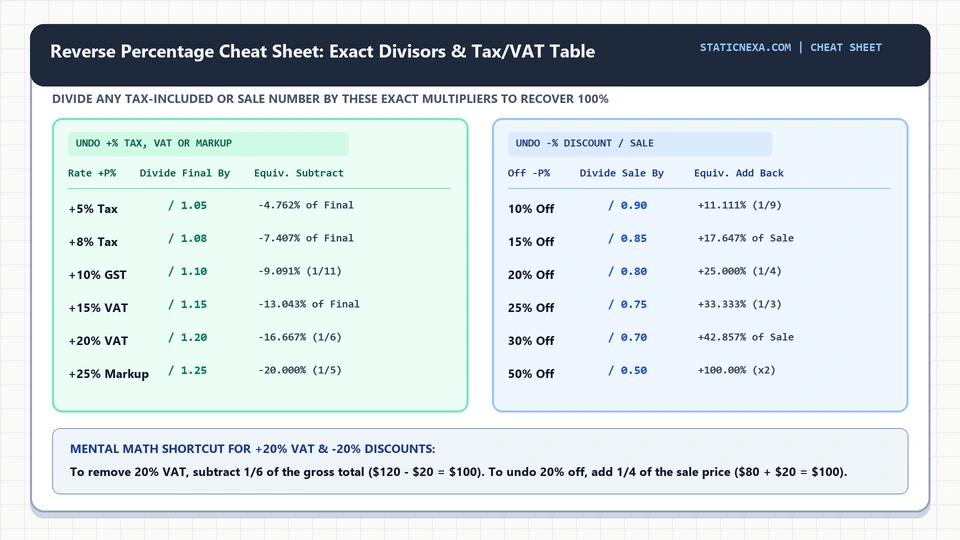
| Rate / Scenario | Meaning of Final Value | Exact Divisor | Example ($100 Original) | Mental Equivalent on Final |
|---|---|---|---|---|
| +5% Tax / Raise | 105% of Original | ÷ 1.05 | $105 ÷ 1.05 = $100 | Subtract 4.762% (1/21) |
| +8% Sales Tax | 108% of Original | ÷ 1.08 | $108 ÷ 1.08 = $100 | Subtract 7.407% (2/27) |
| +10% GST / Tip | 110% of Original | ÷ 1.10 | $110 ÷ 1.10 = $100 | Subtract 9.091% (1/11) |
| +20% Standard VAT | 120% of Original | ÷ 1.20 | $120 ÷ 1.20 = $100 | Subtract 16.667% (1/6) |
| +25% Markup | 125% of Original | ÷ 1.25 | $125 ÷ 1.25 = $100 | Subtract 20.00% (1/5) |
| 10% Off Discount | 90% of Original | ÷ 0.90 | $90 ÷ 0.90 = $100 | Add 11.111% (1/9) |
| 20% Off Discount | 80% of Original | ÷ 0.80 | $80 ÷ 0.80 = $100 | Add 25.00% (1/4) |
| 25% Off Discount | 75% of Original | ÷ 0.75 | $75 ÷ 0.75 = $100 | Add 33.333% (1/3) |
| 50% Off Clearance | 50% of Original | ÷ 0.50 | $50 ÷ 0.50 = $100 | Double Sale Price (× 2) |
Mental Fraction Shortcuts That Work Without a Calculator
Look closely at the rightmost column of the table above. Because dividing by a decimal fraction p / q equals multiplying by its reciprocal q / p, popular tax and discount rates turn into effortless mental fractions:
- Removing 20% VAT (Subtract 1/6): A 20% increase equals
6/5of the original price, so the VAT inside that gross total equals exactly1/6of the gross amount. On a $180 receipt, one-sixth is$30, leaving a$150pre-VAT cost! - Removing 25% Markup (Subtract 1/5): Since
125% = 5/4, the markup makes up1/5(or 20%) of the final selling price. Remember this rule for retail pricing: a 25% markup on cost always equals a 20% gross margin on selling price. - Undoing 20% Off Sale (Add 1/4): After 20% off, the sale price equals
4/5of retail. To jump back up to5/5, add1/4(25%) of the sale price. If discounted shoes sell for$60, adding one quarter ($15) immediately reveals the$75sticker price. - Undoing 25% Off Sale (Add 1/3): Paying 75% (
3/4) means adding1/3of the sale price restores the full original figure. On a$90clearance item, adding one third ($30) recovers$120in your head.
Real-World Uses Across Accounting, Retail & Compensation
Working backward from post-percentage totals comes up constantly outside math class:
- Reclaiming Business VAT / GST Input Credits: Invoices paid at retail counters often state only the tax-inclusive total and the statutory rate (such as 10% GST or 20% VAT). Bookkeepers use reverse percentage division to split net deductible expense from reclaimable tax on expense reports.
- Verifying Real Discounts Behind Sale Banners: Some retailers quote the discounted checkout price and the percentage off while hiding the anchor price. Dividing the checkout price by
(1 − D/100)shows whether the original MSRP matches historical pricing or was inflated before the sale. - Working Backward After a Raise or Cost-of-Living Adjustment: Know that your current salary of
$75,600includes an8%annual raise? Divide$75,600 ÷ 1.08to confirm your prior base salary was$70,000. - Estimating Pre-Fee Payouts on Marketplaces & Freelance Platforms: If a payment processor deducts a
5%platform fee and deposits$950into your bank, dividing$950 ÷ 0.95tells you immediately that you must invoice$1,000so your take-home matches your rate target.
Reverse Percentage Formulas in Excel & Google Sheets
When reversing dozens of rows in a financial ledger or e-commerce catalog, put your known post-change price in column A and the percentage rate in column B (formatted as %, so 20% stores as 0.20):
Undo -% Discount (B2 stored as %): =A2/(1-B2)
Part to Total Base (B2 stored as %): =A2/B2
When B2 holds plain integer 20 (not 20%): =A2/(1+B2/100)
5 Common Reverse Percentage Mistakes to Avoid
- Adding or Subtracting the Same Percentage Back: Raising by
20%and subtracting20%produces0.96×(4% below original), while discounting by20%and adding20%also gives0.96×. Never invert a percentage by flipping its sign; invert it by dividing by the multiplier! - Trying to Recover a Positive Price After 100% Off: A
100%discount multiplies any price by0, yielding a$0sale price. Because division by zero is impossible, you cannot back out an original tag price if someone paid zero under a 100% discount. - Mixing Up Markup With Gross Profit Margin: If a store says "items sell for $100 with a 25% markup," the wholesale cost is
$100 ÷ 1.25 = $80($20profit). If instead the store says "$100 with a 25% gross margin," the cost is$100 × (1 − 0.25) = $75($25profit). Always confirm whether the percentage applies to cost (markup) or selling price (margin). - Undoing Stacked Coupons as One Combined Subtraction: If an item got
20% offfollowed by an extra10% coupon, its combined multiplier is0.80 × 0.90 = 0.72(28%effective discount), not0.70(30%off). Divide sequentially (÷ 0.90 ÷ 0.80) or use our Percent Off Calculator. - Forgetting Currency Precision Rules When Reclaiming Tax: Some tax authorities require rounding extracted VAT to the nearest cent (
0.01) line by line rather than across invoice totals, which can shift totals by$0.01due to standard rounding.
Related Percentage Calculators on Staticnexa
Explore our specialized tools across the Math Calculators hub to verify forward and comparative percentage math:
- Percentage Increase Calculator: compute forward growth or add tax and markups to a base cost.
- Percentage Decrease Calculator: subtract percentages and check markdowns.
- Percent Off Calculator: test stacked checkout coupons alongside original price recovery.
- Percentage Calculator: 4-in-1 tool including
X is P% of what number?alongside forward share and change rows.
Read how Staticnexa tests floating-point precision and zero-divisor guards across every calculator in our Editorial & Mathematical Accuracy Policy.
Frequently Asked Questions
How do you reverse calculate a percentage increase?
Divide the final value by (1 + P / 100). For example, if a price after a 20% VAT increase is $120, divide $120 by 1.20 to recover the $100 pre-tax price.
Why cannot you just subtract 20% to undo a 20% increase?
Because the 20% tax was calculated on the smaller original base ($100), whereas subtracting 20% from the final $120 removes $24 and drops you to $96 instead of $100.
How do you find the original price before a percentage discount?
Divide the discounted sale price by (1 - P / 100). If a jacket costs $80 on a 20% off sale, you paid 80% of the sticker price, so $80 / 0.80 = $100 original price.
How do you remove 20% VAT quickly in your head?
Divide the VAT-inclusive gross total by 6 (subtract 1/6). Because adding 20% multiplies by 6/5, the VAT portion is exactly 1/6 of the final receipt.
How do you find the total number if X is P% of an unknown amount?
Divide the known part by the decimal percentage (P / 100). For instance, if 30 represents 15% of a total, 30 / 0.15 = 200.
Why does a 100% discount make reverse percentage impossible?
A 100% discount multiplies the original price by (1 - 1.00) = 0, making every original price equal $0 on sale. Because you cannot divide by 0, the original price cannot be recovered once multiplied by zero.
Mathematical References & Standards
- OpenStax Prealgebra (2e): Section 6.3: Solve Sales Tax, Commission, and Discount Applications (Open textbook foundation on sales tax, original price before discount, and commission bases)
- OpenStax Prealgebra (2e): Section 6.2: Solve General Applications of Percent (Algebraic equation method solving for the unknown Whole base from Part and Percent)
- GOV.UK (HM Revenue & Customs): VAT: Working Out VAT From VAT-Inclusive Prices (Official tax guidance confirming reverse division by (1 + VAT rate) to extract pre-tax net amounts)
- Khan Academy: Percentages: Reverse Percent & Word Problems (Worked practice problems on finding original amounts before percent markups and discounts)