What Percentage Change Actually Tells You
Suppose your monthly newsletter adds 20 new subscribers. Is that a quiet month or a breakthrough? Without knowing where you started, "+20" tells you almost nothing. Going from 10 subscribers to 30 is a massive +200% jump, whereas going from 10,000 to 10,020 is a modest +0.2% bump.
Percentage change puts any shift into context by measuring the raw difference against the original starting point. That is why it shows up everywhere, from quarterly revenue and stock moves to website traffic, utility bills, and lab measurements. If you already know the direction of your calculation and want to add a markup or compute a store discount, switch to our Percentage Increase Calculator or Percentage Decrease Calculator, or browse all percentage tools in our Math Calculators hub.
How to Calculate Percentage Change
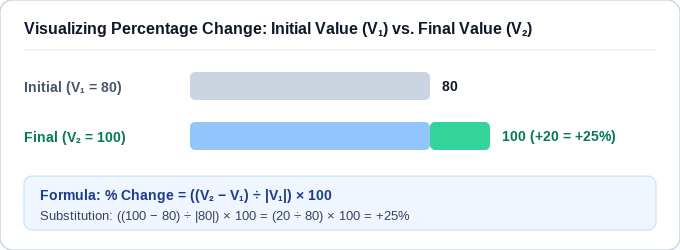
To find percentage change by hand, or to double-check the lines shown in the Math Notebook above, follow this standard equation:
- V₁ (Initial Value): Your older, baseline, or starting figure.
- V₂ (Final Value): Your newer or ending figure.
- V₂ − V₁: The raw change. A positive number means growth; a negative number means a drop.
- |V₁|: The absolute value of your starting point, used so upward movements stay positive even when
V₁is negative (explained in the edge-cases section below). - × 100: Converts the decimal ratio (such as
0.25) into a readable percentage (25%).
Worked Real-World Examples
Notice in the table below how the same raw difference can produce very different percentages depending on the size of V₁, and how decimal rates work the exact same way as whole numbers:
| Real-World Scenario | Initial (V₁) | Final (V₂) | Raw Change (V₂ − V₁) | Decimal Ratio | % Change |
|---|---|---|---|---|---|
| Blog visits month-over-month | 80 | 100 | +20 | +0.25 | +25% |
| Jacket price after markdown | 120 | 90 | −30 | −0.25 | −25% |
| Business profit turnaround | −50 | 25 | +75 | +1.50 | +150% |
| Checkout conversion rate lift | 2.5 | 3.1 | +0.6 | +0.24 | +24% |
| Inventory count unchanged | 450 | 450 | 0 | 0 | 0% |
5 Mistakes & Edge Cases That Trip People Up
1. Percentage Change Is Not Reversible ("Up 25%, Down 25%")
If a stock rises from 80 to 100, that is a +25% gain. If it then falls back from 100 to 80, it does not fall by 25%. Instead, it falls by −20%. Why? Because the first move was divided by 80, while the drop back down was divided by 100. Whenever you want to undo a rise or discount cleanly, use the reverse modes inside our Percentage Increase and Percentage Decrease calculators.
2. Percentage Change vs. Percentage Points
This is one of the most frequent reporting errors in finance and analytics. If a bank raises an interest rate (or your site raises its conversion rate) from 10% to 12%, the difference is +2 percentage points, while the percentage change is ((12 − 10) ÷ 10) × 100 = +20%. Always specify whether you mean percentage points (the simple difference between two percentages) or relative percentage change.
3. Starting From Zero (V₁ = 0)
You cannot compute a finite percentage change when your starting value is 0 because the formula divides by 0. In spreadsheets, this triggers a #DIV/0! error. As documented in our Editorial & Mathematical Accuracy Policy, this calculator clearly marks zero-baseline inputs as Undefined rather than guessing a misleading number. In business reporting, the standard fix is to report the raw unit gain instead.
4. Negative Starting Values (V₁ < 0)
−50 yields −150%, making a big turnaround look negative! Dividing by the absolute value |−50| = 50 keeps upward progress positive (+150%). Our Live Math Notebook automatically displays both values whenever your V₁ is negative so you can match whichever convention your report requires.
5. Percentage Change vs. Percentage Difference
Use percentage change only when one value comes before the other (old vs. new, baseline vs. target). If you are comparing two peer measurements with no natural starting point, such as prices from two competing suppliers, mathematicians use relative difference, which divides the gap by the average of the two numbers rather than picking one as V₁.
Excel & Google Sheets Formula
Working inside a spreadsheet? Put your initial value in cell A2, your final value in B2, enter the formula below in C2, and format column C as Percent (%):
If your sheet may contain zeros in column A, wrap it with IF so your table stays clean: =IF(A2=0,"N/A",(B2-A2)/ABS(A2)).
Frequently Asked Questions
What is the difference between percentage change and percentage difference?
Percentage change is directional and time-based: it divides (New - Old) by the starting baseline |Old|. Percentage difference compares two independent values where neither is the baseline, dividing |A - B| by their average (A + B) / 2.
Why is percentage change from 0 undefined?
The formula divides by the initial value V1. When V1 equals 0, division by zero has no finite mathematical value, so percentage change is undefined.
How do you handle negative starting numbers in percentage change?
Using the absolute value |V1| in the denominator ensures that moving upward (for example, from -50 to +25) yields a positive percentage change (+150%). When V1 is negative, our Live Math Notebook also shows the signed-denominator result so you can verify both conventions.
What is the difference between percentage change and percentage points?
Percentage points measure the simple arithmetic difference between two percentages (for example, 10% to 12% is +2 percentage points). Percentage change measures the relative shift: (12 - 10) / 10 = +20%.
How do I calculate percentage change in Excel or Google Sheets?
Use the formula =(B2-A2)/ABS(A2) where A2 is the initial value and B2 is the final value, then format the result cell as a Percentage.
Mathematical References & Standards
- OpenStax Prealgebra (2e): Section 6.2: Solve General Applications of Percent & Percent of Change (Peer-reviewed open textbook covering percent equations and percent of change)
- Khan Academy: Percentage Change Review & Worked Word Problems (Interactive arithmetic reference on percent increase and decrease)
- Wikipedia: Relative Change and Difference (Formal definitions contrasting relative change, percent error, and relative difference)
- NIST / SEMATECH: e-Handbook of Statistical Methods (Reference standards for relative error and quantitative comparison)